text render plugin
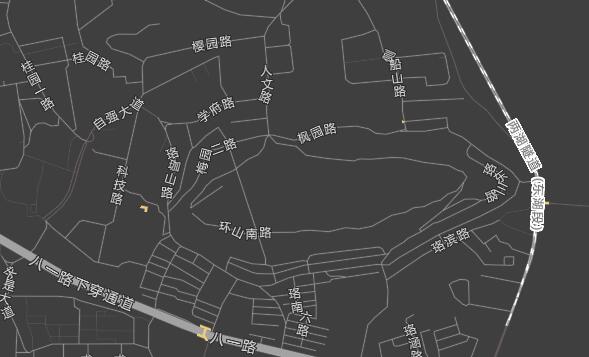
A render plugin that draws text for point data. The icon render plugin also supports text drawing; unlike it, the text render plugin supports drawing text along a line, which the icon plugin does not.
- Text along a line
Configuration
{
  // [必填] 渲染插件对象
  renderPlugin: {
    // [必填] 插件类型,固定为text
    type: "text",
    // [必填] 数据配置
    dataConfig: {
      // [必填] 数据类型,固定为point
      type: "point",
      // [可选] 默认为false
      // 声明是否只包含2D数据。
      // 设为true时,VectorTileLayer会开启瓦片的模板测试(stencil test),
      // 剪切掉超过瓦片范围的数据,消除绘制时瓦片重叠部分的绘制问题
      only2D: true
    },
    // [可选] 默认为null
    // 渲染场景配置
    sceneConfig: {
      // [Optional] Default: "one"
      // The src parameter of the WebGL blendEquation; possible values:
      // 0, 1, "src color", "one minus src color", "src alpha", "one minus dst color", "dst alpha",
      // "one minus dst alpha", "constant color", "one minus constant color", "constant alpha",
      // "one minus constant alpha", "src alpha saturate"
      blendSrc: "one",
      // [Optional] Default: "one minus src alpha"
      // The dst parameter of the WebGL blendEquation; possible values:
      // 0, 1, "src color", "one minus src color", "src alpha", "one minus dst color", "dst alpha",
      // "one minus dst alpha", "constant color", "one minus constant color", "constant alpha",
      // "one minus constant alpha", "src alpha saturate"
      blendDst: "one minus src alpha",
      // [Optional] Default: [0, 1]
      // The WebGL depth value range
      depthRange: [0, 1],
      // [Optional] Default: null
      // A feature-filter expression; data matching the condition will not be rendered
      excludes: null

      // [可选] 默认为always,即永远显示
      // WebGL深度测试函数,可选的值有 always, never, <, <=, !=, >, >=
      depthFunc: 'always',
      // [可选] 默认为false
      // 是否开启图标全局定位,即同一数据在不同级别瓦片上,都会保持统一的绘制。
      // 例如如果开启了fading,同一数据出现在新的级别瓦片上,但不会有fading入场。
      uniquePlacement: false,

      // [可选] 默认为false
      // 是否开启碰撞检测(需要图层 options.collision 同时为 true 才生效)
      collision: false,
      // [可选] 默认为false
      // 是否开启碰撞检测的透明度过渡效果
      fading: false,
      // [可选] 默认为 16*14
      // 碰撞检测过渡效果的持续时间
      fadingDuration: 16 * 14,
      // [可选] 默认为600
      // 图标通过碰撞检测,从隐藏到显示的过渡效果的开始延迟
      fadeInDelay: 600,
      // [可选] 默认为100
      // 图标未通过碰撞检测,从显示到隐藏的过渡效果的开始延迟
      fadeOutDelay: 100
    }
  },
  // [可选] 默认为true
  // 数据过滤条件
  filter: true,
  // 样式属性
  symbol: {
    textSize: 14,
    textFill: "rgba(0,0,0,1)",
    textName: "{name}",
    textPlacement: "line",
    mergeOnProperty: "road_name"
  }
}
Note: the text plugin's sceneConfig defaults have been cross-checked against the 2026 source code: when a VectorTileLayer style does not set sceneConfig, it is treated as
{}, and collision / fading are both disabled by default (collision additionally requires the layeroptions.collision: trueto take effect); vector layers (PointLayer) injectICON_PAINTER_SCENECONFIGby default (collision: true, fading: false). The old documentation said fading defaults to true, which was incorrect and has been fixed (2026 cross-check).
For more on the filter data filtering conditions, see feature-filter.
Supported data types
- For vector tile data, Features with a type of Point, LineString, Polygon, MultiPoint, MultiLineString or MultiPolygon are supported
- For GeoJSON data, Features with a type of Point, LineString, Polygon, MultiPoint, MultiLineString or MultiPolygon are supported
- For vector layers, maptalks.Marker, maptalks.MultiPoint, maptalks.LineString, maptalks.MultiLineString, maptalks.Polygon, maptalks.MultiPolygon are supported.
Dynamic styles
Most style properties support function-type expressions, allowing different style values to be set based on the zoom level or data property values.
For example, the following makes the text size increase with the map zoom level:
{
 "textSize": {
    "stops": [[1, 2], [20, 40]]
  }
}
Supported Symbol style properties
The text render plugin supports the text style properties.
In addition, the following properties are also supported:
textBloom
Default: false
Boolean — whether to enable the bloom post-processing effect (in the 2026 source code, TextPainter.getBloomSymbol uses textBloom; the old documentation wrote markerBloom, which was incorrect).
This document has been cross-checked against the @maptalks/gl-layers 2026 source code (api-notes-vt-gl.md)